.png)
A Stage Show Can Survive a Missed Cue. It Cannot Survive a Dead Microphone.
The sound check went perfectly. The show starts, the singer walks toward the edge of the stage, and the audio suddenly drops and cuts in and out. The audience does not know why. The performer has no choice but to keep going. In live production, there is a simple rule: a missed cue can be forgiven, but a microphone that stops working cannot.
Many people think stage audio is about buying a more expensive microphone. But anyone who has run live events knows the real problem is rarely a single bad device. It is a system that was not planned around the way performances actually work: performers move, multiple microphones are used at the same time, the environment changes, and changeover time is only a few minutes.
That is why a stage audio solution cannot only answer "which microphone should I use?" It also has to answer "how do I keep the whole system stable during the show?"
.png)
Why Stage Audio Fails
1. Performers are not static
A singer moves from one side of the stage to the other. A host walks into the audience. A musician changes position. If the microphone is not positioned well, or if the receiver antennas are not in line of sight, the signal can suddenly weaken.
2. Multiple microphones work at the same time
A show is rarely one microphone. Lead vocals, backing vocals, a host, a guest and instruments may all need wireless channels at the same time. If there are not enough channels, the team ends up swapping devices or making performers wait.
3. The frequency environment is complex
There may be TV towers, other wireless equipment, mobile signals or Wi-Fi around the venue. Even if everything worked during rehearsal, the frequencies may have changed by showtime.
4. Changeover time is short
The most stressful part of an event is often not the performance itself, but the few minutes between acts. If equipment is complicated to set up or needs to be re-paired, the rhythm of the show is affected.
5. Microphone pickup position is unstable
Inexperienced performers may move the mic away from their mouth, look down or turn sideways. A headset microphone solves this by keeping the pickup consistently close to the mouth, regardless of how the performer moves.
Different Show Sizes Have Different Problems
Small shows: 2–4 people
Weddings, bars, school events, corporate parties and small stages. Usually one or two vocalists need a headset mic and the host needs a handheld. The priorities are simple: easy changes, stable audio and compact storage.
Medium shows: 4–8 people
Bands, church services, campus events and small tours. Besides the lead vocalist and host, there may be backing vocals, guest performers and even wireless instrument channels. This is where a multi-channel receiver becomes essential, instead of carrying a separate receiver for every microphone.
Large shows: 8 or more people
Large events, production companies, corporate annual meetings, festivals and multi-act lineups. Venues face crowded frequencies, more devices, short setup windows and changing technical crews. They need a system that can carry multiple channels, offers more frequencies and is easy to manage.
Tours and rental companies
Touring means constant setup and breakdown, transport and reconfiguration in different venues. Rental companies often need one system to serve different clients. That makes scalability, interference resistance and complete accessories more important than one perfect device for a single event.
What a Complete Stage System Really Includes
People often think only about the microphone, but live sound is a chain.
Pickup
The performer's voice or instrument has to be captured accurately. Headset mics suit singers and actors. Lavalier mics suit presenters and situations where discretion matters. Handheld mics suit hosts and interactive guests.
Wireless transmission
The audio signal travels wirelessly from the transmitter to the receiver. Stability depends on frequency planning, antenna position, signal strength and environmental interference.
Reception
The receiver converts the wireless signal into audio and sends it to the mixer or amplifier. If the receiver is in the wrong place, everything before it does not matter.
Amplification
Finally, a professional amplifier pushes the sound out so the whole audience can hear it. This is often overlooked, but it decides whether the back row can hear the show.
What to Configure for Each Show Size
Solo vocalist / host
Start with a good headset microphone. The MiCWL Beta-CC Beige Cardioid Headset Mic is lightweight and keeps the pickup close to the mouth, so turning and moving do not cause inconsistent volume. It works with common Shure, Sennheiser and AKG systems. Confirm the connector before ordering.
Small show with 2–4 people
The AD4Q 4-Channel UHF Wireless Microphone System is a practical choice. Four microphones share one receiver, so the crew does not need multiple sets. It works well for bars, weddings, campus events and small productions.
Full show with 6–8 or more performers
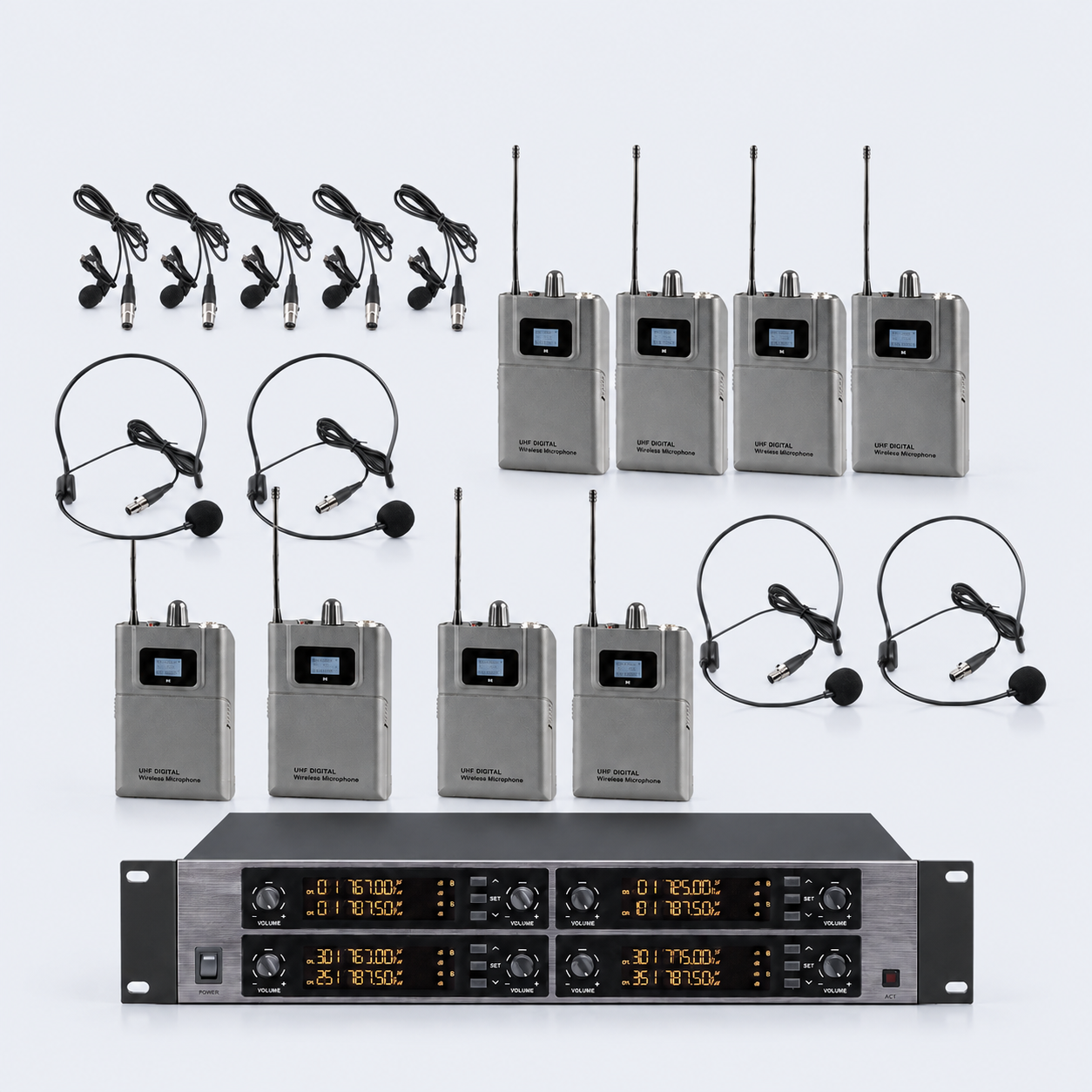
The D3900 8-Channel Digital Wireless Bodypack System is the recommended professional option. The system includes 8 bodypack transmitters, and you can choose 8 lavalier microphones for discreet placement or 8 headset microphones for singers, actors and active performers. The 19-inch 2U rack receiver has a gold-black metal front panel and a digital LED display, which makes it easy to monitor all 8 channels, signal strength and frequencies. The system uses encrypted UHF wireless transmission for secure, anti-interference performance, with a range of 100–300 meters in open areas. It is designed for bands, stage performances, schools, churches, conferences and live events.
Main sound reinforcement
The microphone system captures sound. The amplifier pushes it to the audience. The MiCWL FP-7000 is a 2-channel professional digital amplifier with four selectable power ratings from 2600W to 4800W. It fits medium and smaller live venues and event spaces.
Reference pricing: D3900 $988 (was $1,788) · AD4Q from $388 · Beta-CC from $25.99 · FP-7000 from $199. Wholesale pricing is available for bulk orders.
How to Decide the Number of Channels
The rule is simple: count the number of wireless microphones that will be used at the busiest point in the show, then add one spare.
- 1–2 channels: hosting, solo vocals and small presentations
- 4 channels: small bands, weddings, campus events and corporate meetings
- 8 channels: full performance teams, tours, multi-act lineups and larger events
Do not buy the largest channel count just because it might be useful later. More channels means more frequency planning and more operator responsibility. A better approach is to buy one level above your actual busiest need, while keeping the system expandable.
Complete Stage System Setup Process
Step 1: Define the production requirements
Show type, number of performers, maximum simultaneous microphones, venue size, whether a PA system already exists, and whether the gear needs to travel.
Step 2: Plan the channels
List lead vocals, backing vocals, hosts, guests, instruments and spares. Then decide the channel count.
Step 3: Plan frequencies
At the venue, scan the current environment with the receiver and choose clean frequencies. Do not reuse the same frequencies from the last show without checking.
Step 4: Place the antennas
Keep antennas away from metal, do not hide them inside racks, point them toward the stage and raise them when possible. If the stage is far from the equipment rack, consider remote antennas.
Step 5: Set the gain
Calibrate with the performer's normal volume. Too much gain creates clipping. Too little creates noise. Leave a little headroom for sudden increases.
Step 6: Connect the PA
Run the receiver output to the mixer or amplifier, then adjust levels according to the room size. Check the sound from different positions in the audience, not only beside the rack.
Step 7: Test the full room
Have one person walk the stage and audience area with a transmitter while another person listens at the front of house. Mark weak spots before the show.
Step 8: Prepare backups
Spare batteries, spare microphones and spare channels should be placed where they can be reached quickly. Check everything before showtime.
Common Problems and Quick Fixes
Sudden dropouts
Check the battery first, then the antenna position, then rescan frequencies. Often the problem is occupied frequencies or blocked antennas, not a broken device.
Feedback
Usually caused by the microphone being too close to the speakers, excessive gain or poor speaker placement. Lower the gain first, then adjust the microphone and speaker direction.
Inconsistent volume
Check whether the performer is moving and whether the mic is loose. Then check gain and receiver signal strength.
Interference or bleed between channels
Channels may be too close together or devices may be interfering with each other. Rescan and ensure enough spacing between frequencies.
Muffled sound
The pickup may be blocked, the microphone may be too far from the mouth, or the output stage may be misconfigured. Adjust the fit and gain, and the problem usually improves.
Maintenance and Long-Term Use
Stage equipment needs care before every show. For production companies, rental companies and venue operators, maintenance is part of daily work:
- Check batteries and connectors after every show instead of discovering problems at the next rehearsal.
- Keep spare components for common devices, especially bodypacks, headset microphones, lavaliers and cables.
- Keep a simple equipment number and frequency record so the crew can set up quickly in a new venue.
- Confirm wholesale pricing and OEM requirements before bulk purchasing, so accessories remain compatible if brands are mixed.
Frequently Asked Questions
Why can't a stage show use ordinary conference microphones?
Conference microphones are designed for tabletop speech and are not suited to movement or long-distance pickup. Stage productions need headset, lavalier, handheld and bodypack systems, plus stable multi-channel UHF reception.
Should I choose a 4-channel or 8-channel system?
It depends on simultaneous usage. If six or more performers are common, choose 8 channels to avoid improvising with multiple systems.
Should the D3900 be configured with lavalier or headset microphones?
Lavaliers are lower visibility and suit presenters. Headsets keep the pickup close to the mouth and suit singers, actors and active performers. You can choose 8 of either type at purchase, and the 8 channels operate independently.
Which is better for stage: a headset mic or a handheld mic?
Singers and actors often need free hands and stable positioning, so a headset is recommended. Hosts and guests usually prefer a handheld for easier handoff.
Can stage equipment be purchased in bulk?
Yes. Production companies, rental suppliers, schools and event organizers can request wholesale tier pricing and OEM branding for bulk orders.
Can one system work in multiple venues?
Yes, provided the system is expandable, frequencies are adjustable and accessories are complete. Run a frequency scan and a full-room test in every new venue.
How to Get a Stage System Quote
If you need a complete live audio setup, please tell us:
- Show type: band, wedding, church, school, tour or corporate event
- Maximum number of simultaneous microphones
- Venue size and approximate audience capacity
- Whether you need mobile equipment, multiple systems or OEM branding
- Whether an existing PA system is available or the full system is needed
With that information, we can recommend a solution that fits the actual show workflow, not just the largest device on the page.
.png)